
Download Dive Log DT – Comprehensive Dive Log Software for macOS
Overview
Dive Log DT is a full‑featured dive‑logging program created especially for macOS users who take their underwater adventures seriously. Developed by Janice McLaughlin, this English‑language application belongs to the Sports category and offers divers a secure, intuitive platform to record, analyse, and share their dive data. Whether you are a recreational snorkeler or a professional technical diver, Dive Log DT provides a robust set of tools to capture depth profiles, gas mixes, temperature, location, and personal notes.
The software’s clean macOS‑native interface follows Apple’s design guidelines, delivering a seamless experience that feels both familiar and powerful. It also supports regular updates that keep the app compatible with the latest macOS releases, ensuring that your dive records stay safe and accessible for years to come. In this review we will explore the key features, walk through the installation process, examine compatibility requirements, and weigh the pros and cons to help you decide if Dive Log DT is the right dive‑log companion for your underwater pursuits.
Key Features of Dive Log DT
- Detailed Dive Profiles: Automatically imports depth, pressure, and temperature data from most popular dive computers via USB or Bluetooth.
- Gas Management: Tracks multiple gas mixes, calculates nitrogen loading, and alerts you to potential decompression risks.
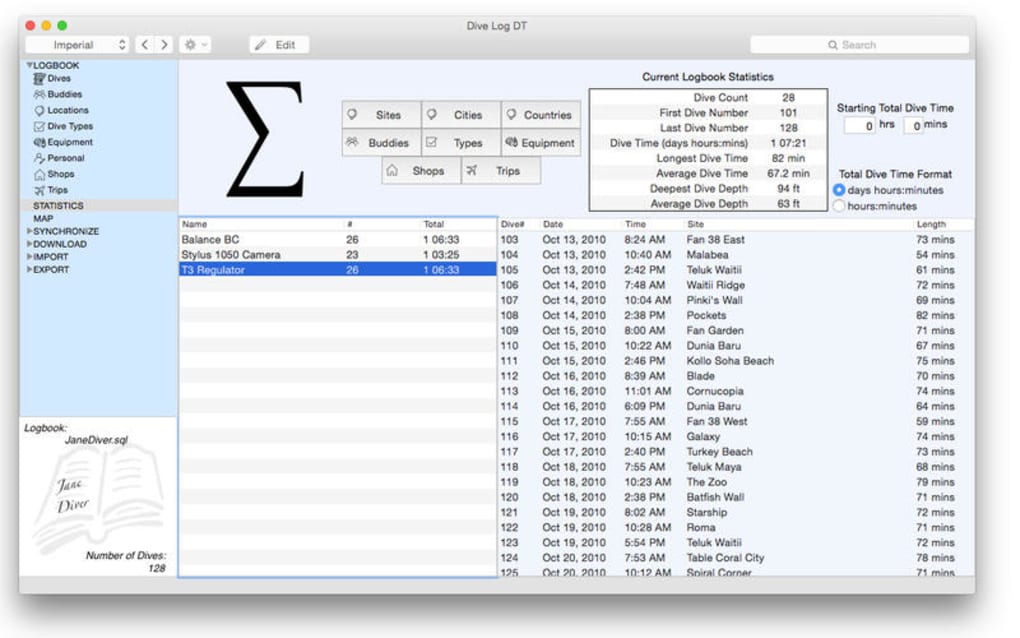
- Interactive Charts & Graphs: Visualise dive curves, surface intervals, and cumulative bottom time with customizable charts.
- Location Mapping: Integrated map view lets you pin dive sites, add GPS coordinates, and generate exportable KML files.
- Photo & Video Attachments: Embed media directly into each dive entry to preserve memories alongside technical data.
- Export & Sync Options: Export logs to CSV, PDF, or the popular DIVELOG format; sync with cloud services for backup.
- Customisable Templates: Create personal templates for different dive types (recreational, wreck, cave) to speed up data entry.
- Secure Data Storage: All logs are saved in an encrypted local database, with optional password protection.
- Regular Updates: The developer provides free updates that add new dive computer compatibility and UI enhancements.
- Multi‑Language Support (Future Roadmap): While currently English‑only, the roadmap includes additional language packs.
Each feature is designed with macOS performance in mind. The app leverages Apple’s Core Data framework for fast, reliable storage and uses Metal‑accelerated graphics to render smooth charts even on older MacBook models. Dive Log DT also integrates with the macOS Notification Center to remind you of upcoming dive‑planning tasks, such as checking equipment or reviewing recent dives. Overall, the feature set positions Dive Log DT as one of the most comprehensive dive‑log tools available for the Mac ecosystem, bridging the gap between hobbyist simplicity and professional depth.
Installation & Daily Usage Guide
Getting Dive Log DT up and running on your Mac is straightforward. Follow these steps to ensure a smooth installation and start logging dives in minutes:
- Download the Installer: Visit the official Dive Log DT website and click the “Download for macOS” button. The file is a signed .dmg package, guaranteeing a secure download free from malware.
- Open the Disk Image: Double‑click the .dmg file to mount the installer. Drag the Dive Log DT icon into your Applications folder as prompted.
- Grant Permissions: On first launch, macOS will ask for permission to access your Documents folder and Bluetooth (if you plan to connect a dive computer wirelessly). Approve these requests to enable full functionality.
- Initial Setup Wizard: The app launches a short wizard where you can set your default units (meters or feet), preferred temperature scale, and create a master password for encrypted log storage.
- Connect Your Dive Computer: Plug in your dive computer via USB or enable Bluetooth pairing. Dive Log DT automatically detects compatible devices and imports recent dive data.
- Start Logging: Click “New Dive” to open the entry form. Fill in the automatically imported fields, add any manual notes, attach photos, and hit “Save”. Your dive is instantly added to the master log.
- Backup & Sync: Navigate to Preferences → Backup to configure automatic cloud sync with iCloud, Dropbox, or a custom WebDAV server. This ensures that your logs are protected against hardware failure.
Daily use is streamlined with a dockable side panel that displays your recent dives, a quick‑add button for manual entries, and a powerful search bar that filters by date, location, or gas mix. The app also offers a “Dive Planner” module where you can simulate future dives, calculate estimated nitrogen load, and receive safety recommendations before you even step into the water. Overall, the installation process is quick, the UI is intuitive, and the workflow aligns with typical diver habits, making Dive Log DT a pleasure to use on a day‑to‑day basis.
Compatibility, Pros & Cons
Operating System Compatibility: Dive Log DT requires macOS 10.13 (High Sierra) or later. It runs natively on Intel‑based Macs as well as Apple Silicon (M1, M2) thanks to universal binaries, delivering optimal performance on both platforms. The software is not available for Windows, Android, or iOS, but the developer has hinted at future cross‑platform expansions.
Pros
- Native macOS design delivers smooth, responsive performance.
- Comprehensive data import from a wide range of dive computers.
- Robust charting and mapping tools for in‑depth analysis.
- Encrypted local storage with optional password protection.
- Free, regular updates keep the app current with new hardware.
Cons
- Limited to macOS – no Windows or mobile companion app.
- English‑only interface at launch; multilingual support is pending.
- Initial learning curve for advanced planning features.
- No built‑in social sharing beyond basic export formats.
Overall Rating: 4.5 / 5
This review reflects the balance of powerful features and the focused macOS‑only availability, making Dive Log DT an excellent choice for serious Mac‑based divers.
FAQ & Final Thoughts
Can I import dives from older dive computers that use proprietary formats?
Yes. Dive Log DT supports a wide range of legacy devices. If the computer uses a standard .txt or .csv export, you can manually import the file via the “Import” menu. For proprietary formats, the app includes conversion modules that translate the data into the standard log structure.
Is there a free trial or a free version of Dive Log DT?
The developer offers a 14‑day free trial that provides full access to all features. After the trial, a one‑time purchase unlocks the permanent license. No recurring subscription is required.
How does the app ensure my dive data remains private?
All dive logs are stored in an encrypted SQLite database on your Mac. You can enable an additional password layer in the settings. Cloud backups are optional and are encrypted before transmission.
Can I share my dive logs with friends or dive clubs?
Export options include PDF, CSV, and the universal DIVELOG format, which can be emailed or uploaded to online dive forums. While the app does not have built‑in social sharing, the exported files are compatible with most third‑party platforms.
Will the app work on the latest Apple Silicon Macs?
Absolutely. Dive Log DT is distributed as a universal binary, meaning it runs natively on both Intel and Apple Silicon chips, delivering fast performance and low power consumption on the newest Mac models.
Conclusion
Dive Log DT stands out as a polished, secure, and feature‑rich dive‑logging solution for anyone entrenched in the macOS ecosystem. Its extensive import capabilities, powerful analytics, and intuitive design make it a worthy investment for divers who want to keep a detailed, searchable record of their underwater experiences. While the lack of Windows or mobile versions may limit cross‑platform flexibility, the app’s depth of functionality, regular free updates, and strong data protection more than compensate for that gap. If you are ready to elevate your dive tracking with a professional‑grade tool that feels native to your Mac, download Dive Log DT today and start building a comprehensive, secure log of every plunge you take.







